
A potential customer finds your business on Google, clicks your website, and lands on your homepage.
They are interested.
They want to learn about your service, understand what you offer, see whether they can trust you, and possibly book an appointment.
But then something goes wrong.
They can’t immediately find the service they’re looking for. The navigation is confusing. The booking button is buried. Important information is scattered across different pages. The contact form asks for too much information. On mobile, the page feels difficult to use.
After a few minutes, the customer leaves.
They may never come back.
This is one of the most overlooked problems with business websites: getting visitors to your website is only half of the job. The website also needs to make it easy for those visitors to take the next step.
For service-based businesses, that next step is often a booking, consultation, phone call, quote request, or appointment.
A well-structured website can make that journey feel natural.
A poorly structured website can make a customer work for the information they need.
And when customers have to work too hard, some will simply choose another business.
Your Website Is Part of Your Sales Process
Many businesses still think of their website as an online brochure.
It contains the company logo, services, about section, contact information, and a few images.
But today’s business website can do much more.
Your website can be the first stage of your customer acquisition process.
A customer may discover your business through Google Search, Google Maps, social media, an advertisement, an AI search experience, or a referral.
They then arrive on your website.
At that moment, the website has an important job.
It needs to help the visitor understand:
- What does this business offer?
- Is this service right for me?
- Why should I trust this business?
- What should I do next?
- How can I book?
If the website answers those questions clearly, the visitor has a straightforward path forward.
If the answers are difficult to find, the customer journey becomes unnecessarily complicated.
This is why website structure and user experience are closely connected to the way customers interact with a business online.
Google also considers overall page experience, including mobile usability, security, Core Web Vitals, and whether the main content is easy to distinguish from distracting elements. Google emphasizes that there isn’t one single “page experience” ranking signal, but providing a good overall experience is important for users and can contribute to search success. Google for Developers
What Does Website Structure Actually Mean?
Website structure is the way your pages, navigation, content, services, and calls to action are organized.
Think about a physical business.
When you walk into a well-organized store, you usually know where to go.
There may be clear sections, signs, a reception desk, staff available to help, and an obvious checkout process.
A good website should create a similar sense of direction.
For example, a service business might have:
Homepage
→ Services
→ Individual Service
→ Service Information
→ Trust & Reviews
→ Booking
This doesn’t mean every business needs exactly the same structure.
A dental clinic, salon, home-care company, law firm, and marketing agency may all require different customer journeys.
The important thing is that the structure should reflect how customers actually make decisions.
A customer shouldn’t have to understand your internal business structure to find what they need.
The website should do that work for them.
A Customer Shouldn’t Have to Search for the Service They Want
Imagine someone is searching for a specific service.
They find your website and arrive on the homepage.
Instead of seeing a clear list of services, they see a large amount of general information.
They scroll.
More information.
Another section.
More images.
Another paragraph.
Eventually, they find a small link to your services.
Then they have to search again.
This creates friction.
A visitor who already knows what they want shouldn’t have to fight their way through the website to find it.
For example, a salon might make its main services immediately accessible:
Hair Services
Nail Services
Facial Treatments
Bridal Services
Beauty Packages
A dental practice might organize its services around:
General Dentistry
Cosmetic Dentistry
Dental Implants
Teeth Whitening
Emergency Dentistry
The exact categories depend on the business.
The principle is simple:
Make the path to the customer’s desired service obvious.
Your Homepage Should Guide Visitors
The homepage is often the first major interaction a customer has with your business.
That doesn’t mean the homepage needs to explain absolutely everything.
Its job is to help visitors understand the business and decide where they should go next.
A strong homepage might answer these questions in a natural sequence:
What do you offer?
Clearly communicate the primary service or solution.
Who do you help?
Make it obvious who the business serves.
Why should customers trust you?
Show relevant proof, experience, reviews, credentials, or other trust signals.
What services are available?
Give visitors a clear path toward the services they are interested in.
What happens next?
Explain the next step.
How can they take action?
Provide an obvious booking, consultation, contact, or quote option.
The homepage doesn’t need to force every visitor to take the same action.
It should simply make the appropriate next step easy to find.
Your Service Pages Are More Important Than You Think
One of the biggest mistakes businesses make is putting every service on a single page.
It may seem convenient.
But customers often have specific needs.
Someone searching for “teeth whitening” doesn’t necessarily want to read a generic page about every service offered by a dental practice.
They want information about teeth whitening.
Someone looking for a facial doesn’t necessarily want to read ten paragraphs about every service at a salon.
They want to understand the facial treatment.
This is why dedicated service pages can be valuable.
A well-designed service page can explain:
- What the service is
- Who it is suitable for
- What customers can expect
- Important benefits
- Common questions
- Relevant reviews
- What happens during the process
- How to get started
- How to book
The goal isn’t to overwhelm visitors with information.
The goal is to give them the information they need to feel comfortable taking the next step.
The Booking Button Should Be Easy to Find
This sounds obvious.
But many websites make customers search for the booking option.
A visitor decides:
“I’m ready to book.”
Then they look around the page.
They check the navigation.
They scroll down.
They open another page.
They check the footer.
Eventually, they find a button that says something vague like:
Learn More
or
Get Started
That creates unnecessary uncertainty.
If the customer’s desired action is to book, make the action clear.
Use language such as:
Book an Appointment
Schedule Your Consultation
Check Availability
Book Your Service
Schedule a Call
Request a Quote
The exact wording should match the business and the customer’s intent.
The important thing is that the visitor should not have to guess what happens when they click.
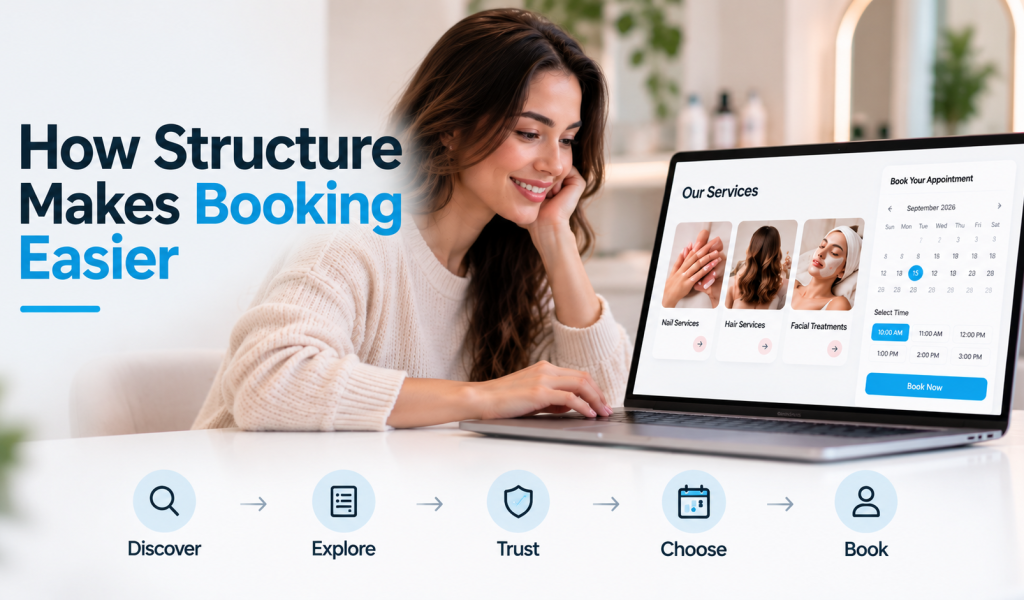
A Good Website Creates a Natural Booking Journey
Think about the customer’s journey as a series of small decisions.
A visitor discovers your business.
↓
They understand what you offer.
↓
They find the service they need.
↓
They learn enough about it to make an informed decision.
↓
They see evidence that your business is trustworthy.
↓
Their questions are answered.
↓
They understand what happens next.
↓
They book.
The website doesn’t need to pressure the visitor.
It simply needs to remove unnecessary confusion.
That’s what good website structure is really about.
Trust Should Be Part of the Customer Journey
Before someone books a service, they may have doubts.
They might ask themselves:
“Is this business legitimate?”
“Are they experienced?”
“Have other customers had a good experience?”
“Will I get what I’m expecting?”
“What happens after I book?”
Your website can answer many of these questions before the customer ever contacts your team.
Depending on the business, useful trust elements can include:
- Customer reviews
- Testimonials
- Case studies
- Real business photos
- Team information
- Certifications
- Experience
- Before-and-after examples where appropriate
- Frequently asked questions
- Clear service information
- Transparent policies
But trust isn’t just about having a testimonial page.
Placement matters.
A customer considering a particular service may benefit from seeing relevant proof near that service.
For example, someone considering a treatment may feel more confident after seeing genuine customer feedback related to that treatment.
The website should support the customer’s decision at the moment they are making it.
Don’t Make Customers Fill Out Huge Forms
Another source of friction is the contact or booking form.
A business may want to collect as much information as possible.
So the form asks for:
- Full name
- Phone
- Address
- Company
- Job title
- Budget
- Website
- Service
- Preferred date
- Preferred time
- Several additional questions
Some of this information may be useful.
But the question is:
Does the customer need to provide all of it right now?
If the customer simply wants to schedule a consultation, an unnecessarily long form can make the process feel like work.
A better customer journey collects the information that is genuinely useful at that stage.
Additional information can often be collected later when appropriate.
The goal is not to collect the maximum amount of data.
The goal is to make the next step easy while still gathering what the business actually needs.
Your Website Should Work Well on Mobile
A beautiful desktop website isn’t enough.
Customers increasingly interact with businesses through phones, and Google explicitly recommends ensuring that content displays well on mobile devices as part of providing a good overall page experience. Google for Developers
Think about what happens when someone is standing in a parking lot searching for a nearby business.
They don’t want to:
- Zoom into the page
- Search through tiny navigation menus
- Fight with pop-ups
- Scroll endlessly
- Complete a complicated form
- Hunt for a phone number
- Search for a booking button
The mobile experience should make important actions obvious.
For a local business, that could mean making it easy to:
Call
Get Directions
View Services
Book
Send an Inquiry
The right actions depend on the business, but they should be easy to access.
Your Website Should Connect With Your Booking System
A website becomes much more useful when it isn’t operating alone.
Imagine a customer visits your service page.
They decide to book.
They select a service and a convenient time.
The booking enters the business’s system.
The customer receives confirmation.
The business receives the appointment information.
Reminders can be sent before the appointment.
After the appointment, the business can follow up appropriately.
Now the website isn’t just displaying information.
It is connected to the operational side of the business.
That can create a much smoother experience for both the customer and the team.
This is especially important for businesses that depend heavily on appointments, consultations, calls, and lead follow-up.
What Happens When Someone Doesn’t Book?
This is where many businesses think the customer’s journey ends.
Someone visits the website.
They don’t book.
Nothing happens.
But not every visitor is ready to make a decision immediately.
A person might:
- Need more information
- Want to compare options
- Be waiting for payday
- Need to speak with a partner
- Have another question
- Simply not be ready today
That doesn’t necessarily mean they aren’t interested.
When a website is connected to a CRM and appropriate follow-up systems, a business can continue the relationship with people who have provided their information.
For example:
Website inquiry
→ CRM
→ Follow-up
→ Conversation
→ Booking
This is one reason website development should sometimes be viewed as part of a broader lead generation and customer acquisition system.
Website Structure Also Supports SEO
Website structure isn’t only about making visitors happy.
It can also help search engines understand how your content relates to different topics and services.
Google’s documentation explains that structured site organization, navigation, and features such as breadcrumbs can help users understand where a page sits within a site’s hierarchy. Google also uses structured data to better understand page content where supported. Google for Developers
Imagine a website with clear pages for:
Services
→ SEO
→ Local SEO
→ Google Business Profile
→ GEO
Each page has a clear purpose and relationship to the others.
Visitors can navigate between related services.
Search engines can also better understand the site’s content and organization.
This doesn’t mean that creating more pages automatically produces better rankings.
Every page should have a genuine purpose and provide useful information.
The structure should be designed around the customer and the business first.
Internal Links Can Guide Customers to the Next Step
Internal links are another important part of website structure.
Imagine a visitor reading about one of your services.
The page mentions another related service.
A relevant link gives them a natural next step.
For example:
Local SEO
→ Google Business Profile Optimization
→ SEO Services
→ Book a Strategy Call
This creates a connected journey.
The visitor doesn’t have to return to the homepage every time they want to explore something else.
Good internal linking can also help search engines discover and understand pages across your site.
But again, the purpose shouldn’t be to add links everywhere.
Links should make sense.
They should help the visitor move forward.
Every Important Page Should Have a Purpose
A website can have dozens of pages and still provide a poor customer experience.
The question isn’t:
“How many pages does my website have?”
The better question is:
“What purpose does each page serve?”
A service page should help someone understand a service.
An about page should build confidence.
A contact page should make communication easy.
A booking page should make scheduling straightforward.
A case study should demonstrate relevant experience.
A blog article should answer a genuine question and help establish expertise.
When every page has a clear purpose, the website becomes easier to navigate.
What a Strong Customer Journey Can Look Like
For a service business, a simplified journey might look like this:
Google / Social Media / Referral
↓
Website
↓
Relevant Service Page
↓
Benefits + Information
↓
Trust / Reviews
↓
Clear Call to Action
↓
Booking or Inquiry
↓
CRM
↓
Follow-Up
↓
Appointment
↓
Reminder
↓
Customer
The exact system will vary from business to business.
But the concept is powerful:
Every stage should make the next stage easier.
Your Marketing and Website Need to Work Together
Imagine you spend money on Google Ads.
The advertisement performs well.
People click.
But the landing page is confusing.
The customer can’t immediately understand the offer.
The booking process is difficult.
The form is too long.
The business may conclude:
“The ads aren’t working.”
But the problem could be further down the customer journey.
The same principle applies to SEO.
You can work hard to get a page visible in search.
You can earn clicks.
But if the destination page doesn’t make it easy for visitors to understand the service and take action, some of that opportunity can be lost.
This is why SEO, website design, conversion strategy, CRM, and booking systems can work together.
SEO helps people discover the business.
The website helps them understand the offer.
Trust helps reduce uncertainty.
The booking experience makes action easier.
The CRM keeps the customer journey organized.
Automation can help with appropriate follow-up.
Each component supports the next.
A Beautiful Website Isn’t Automatically a High-Performing Website
A website can look incredible and still produce disappointing business results.
It can have:
- Beautiful animations
- Large images
- Modern typography
- Creative layouts
- Video backgrounds
- Fancy transitions
But if customers can’t find the service they need or understand how to book, the visual design isn’t solving the main problem.
Design matters.
Branding matters.
Professional presentation matters.
But they need to support the customer journey.
The best website isn’t necessarily the one with the most impressive animation.
It’s the one that helps the right visitor understand what the business offers and take the appropriate next step.
How EEZ Tech Solutions Approaches Website Development
At EEZ Tech Solutions, we don’t look at a business website as just a collection of pages.
We look at how the website fits into the entire customer journey.
Before thinking about colors, animations, or layouts, there are more important questions:
Where are your customers coming from?
What are they searching for?
What service are they interested in?
What questions do they have before contacting you?
What might stop them from booking?
What should happen after they submit an inquiry?
Should the lead enter a CRM?
Should they receive follow-up?
Can the booking process be simplified?
Can the website connect with automation or AI?
These questions help determine what the website actually needs.
For some businesses, that might mean a streamlined booking experience.
For others, it might mean better service pages, stronger conversion paths, CRM integration, AI chat, automated follow-up, or a complete redesign of the customer journey.
The technology should support the business objective.
The Future of Business Websites Is More Than Design
Modern business websites are becoming increasingly connected to other systems.
A website can work alongside:
- SEO
- Local SEO
- Google Business Profile
- GEO
- CRM
- GoHighLevel
- AI chatbots
- AI voice agents
- Appointment scheduling
- Marketing automation
- Analytics
- Lead management
This creates opportunities to build a more connected customer experience.
A visitor might discover a business through search, visit a service page, ask an AI chatbot a question, schedule an appointment, receive an automated confirmation, and later receive an appropriate follow-up.
The customer doesn’t necessarily care which technology is running behind the scenes.
They care that the experience is fast, clear, convenient, and trustworthy.
That’s what good technology should accomplish.
Final Thoughts
Your website is often the bridge between being discovered and becoming a customer.
If that bridge is confusing, visitors can disappear even when your marketing is working.
A clear website structure makes it easier for customers to find the service they need, understand what you offer, build confidence in your business, and take the next step.
The goal isn’t to force every visitor to book immediately.
The goal is to remove unnecessary friction for genuinely interested people.
A customer should never have to ask:
“Where do I go from here?”
Your website should answer that question naturally.
When your website, SEO, booking system, CRM, and follow-up processes work together, your website becomes more than an online brochure.
It becomes part of a customer acquisition system.
And that’s where the real opportunity lies.
If your website is getting visitors but you’re not getting enough inquiries, calls, or bookings, the issue may not simply be traffic. Your customer journey may need a better structure.
EEZ Tech Solutions helps businesses build strategic websites and connected digital systems designed to make it easier for customers to discover, understand, trust, contact, and book with them.
Ready to make your website work harder for your business? Contact EEZ Tech Solutions to discuss your website, customer journey, and booking goals.